I am thinking of an idea, each week I give the student a weekly note,
However, earlier this year I was talking with a teacher at a conference and he talked about a worm for use within class, how engaged are our students. This was an interesting project where I developed a jQuery system for students to enter in a rating or use a slider. 1 equalled disengaged, 5 = engaged. Students just wanted to enter a 1. Just because they could.
Now 8 months on, I have been thinking, what if students were able to give me feedback on my teaching, how engaged they were. The only issue is, do I want to know who they are. Should that part be optional? How long should it take them? Will they take it seriously? WIll it fix up some areas of my teaching that I am not aware of? How will it be reported? Do I share it with my students?
What system should I do it in, moodle, google docs, or write one myself?
I do like the idea...
Tuesday, 26 November 2013

Sunday, 24 November 2013
Great RPi resource
http://www.ocr.org.uk/qualifications/by-subject/computing/raspberry-pi/
OCR resources for Raspberry Pi to liven up your lessons
We have been working in collaboration with Raspberry Pi and with leading practitioners to create resources that support the use of the Raspberry Pi in the classroom.
Recipe cards
Classroom Challenges
- Classroom Challenge - Architecture - Learner sheet (PDF, 239KB) NEW
- Classroom Challenge - Architecture - Teacher sheet (PDF, 190KB) NEW
- Classroom Challenge - Architecture - Drag and Drop activity Flash file (SWF, 688KB) NEW
- Classroom Challenge - Connecting to a network - Learner sheet(PDF, 803KB) NEW
- Classroom Challenge - Connecting to a network - Teacher sheet (PDF, 189KB) NEW
- Classroom Challenge - Simple animation - Learner sheet (PDF, 1MB) NEW
- Classroom Challenge - Simple animation - Teacher sheet (PDF, 190KB) NEW
- Classroom Challenge - Hardware characteristics - Learner sheet (PDF, 373KB) NEW
- Classroom Challenge - Hardware characteristics - Teacher sheet (PDF, 190KB) NEW
- Classroom Challenge - Hardware hacking and robotics - Learner sheet (PDF, 575KB) NEW
- Classroom Challenge - Hardware hacking and robotics - Teacher sheet (PDF, 192KB) NEW
Playing a different game
One thing that gets me about the subject area that I teach is the comment, This is Digital Technologies, we need to be on a computer all the time. FALSE.
The more I start looking at the requirements, the more I start to see that I need to get them off a computer and working out their problems through whiteboards, paper and visual diaries.
Here is a something I got them to do last year, this is the seven bridges problem.
Notice that it is outside.
One thing that I have started seriously thinking of is the issue of security. This is something that some students are interested in and some have a rather bad interest in. I notice in the latest cs4fn magazine that it talks about a board game Control-Alt-Hack, http://www.controlalthack.com/, this is something that could create an interesting dynamic within the class. Do students play board games in any other classes?
One thing that is stopping me from getting it is the $50 dollar shipping charge from the states.

The more I start looking at the requirements, the more I start to see that I need to get them off a computer and working out their problems through whiteboards, paper and visual diaries.
Here is a something I got them to do last year, this is the seven bridges problem.
One thing that I have started seriously thinking of is the issue of security. This is something that some students are interested in and some have a rather bad interest in. I notice in the latest cs4fn magazine that it talks about a board game Control-Alt-Hack, http://www.controlalthack.com/, this is something that could create an interesting dynamic within the class. Do students play board games in any other classes?
One thing that is stopping me from getting it is the $50 dollar shipping charge from the states.
One thing that I was shown at cs4hs Adelaide was more of the csunplugged activities. This one looked at a tourist town and how you could make sure only a certain number of ice cream trucks could be used at certain corners.
by the way, the answer is not correct you can do it with six trucks
Saturday, 23 November 2013
Digital Technologies Projects for 2014 ideas
On thing that came to light this year was the projects that I had my Level 3 students complete. I had students work on projects that related to Raspberry Pi and come up with solutions to problems that I knew existed. In 2013 we had our first mashup competition, two days to come up with a viable solution that needed a business, marketing plan and presentation. This is something that I wish to encourage the students to do next year, but we need to start somewhere. I am thinking about wether to get students into teams, this will allow a variety of ideas to develop.
1. Environment Canterbury http://www.ecan.govt.nz has lots of useful information for recreational boaties and kayakers including river flows and navigational safety. Create a Mashup that uses some of this information combined with other sources (eg weather photos, maps) that would be useful for people going out on the water.
2. Catalyst IT’s http://www.catalyst.net.nz mission is ‘to make open source the preferred technology choice of New Zealand.’ Develop a Mashup that would promote the use of open source data to secondary students in Canterbury using information from the Catalyst IT website plus other information sources.
3. One of Land Information New Zealand’s (LINZ) http://www.linz.govt.nz purposes is to encourage land information markets to develop and mature. Develop a Mashup that uses some of LINZ’s information sources (plus any others) to encourage greater use of the data by senior geography students in Canterbury secondary schools.
4. Sensing City http://www.sensingcity.org is a project dedicated to positioning Christchurch as a world leading smart city. Develop a Mashup that enables people to enter their house location and then pull together all/any data that is local to their home so that they are better enabled to understand what is happening in their immediate neighbourhood.
5. Canterbury Development Corporation (CDC) http://www.cdc.org.nz works with other agencies to
help earthquake recovery for local businesses and industry. Develop a Mashup that uses some of their
information with other information sources to help the younger business people re-establish themselves more successfully.
6. Removed due to equipment only available at the event. However it could be possible to contact the person at Tait and get some of the equipment out to the school. API development would be a good introduction to the year.
7. Free choice: Develop a Mashup that uses different information sources and is useful for your target
audience. You will need to discuss this with the competition coordinator.
1. Environment Canterbury http://www.ecan.govt.nz has lots of useful information for recreational boaties and kayakers including river flows and navigational safety. Create a Mashup that uses some of this information combined with other sources (eg weather photos, maps) that would be useful for people going out on the water.
2. Catalyst IT’s http://www.catalyst.net.nz mission is ‘to make open source the preferred technology choice of New Zealand.’ Develop a Mashup that would promote the use of open source data to secondary students in Canterbury using information from the Catalyst IT website plus other information sources.
3. One of Land Information New Zealand’s (LINZ) http://www.linz.govt.nz purposes is to encourage land information markets to develop and mature. Develop a Mashup that uses some of LINZ’s information sources (plus any others) to encourage greater use of the data by senior geography students in Canterbury secondary schools.
4. Sensing City http://www.sensingcity.org is a project dedicated to positioning Christchurch as a world leading smart city. Develop a Mashup that enables people to enter their house location and then pull together all/any data that is local to their home so that they are better enabled to understand what is happening in their immediate neighbourhood.
5. Canterbury Development Corporation (CDC) http://www.cdc.org.nz works with other agencies to
help earthquake recovery for local businesses and industry. Develop a Mashup that uses some of their
information with other information sources to help the younger business people re-establish themselves more successfully.
6. Removed due to equipment only available at the event. However it could be possible to contact the person at Tait and get some of the equipment out to the school. API development would be a good introduction to the year.
7. Free choice: Develop a Mashup that uses different information sources and is useful for your target
audience. You will need to discuss this with the competition coordinator.
Thursday, 21 November 2013
Raspberry Pi and Networks
Luckily our entire staff got to go to CPIT for half a day this week. Through this day I was re-introduced to something that I had done over 10 years ago. Creating a network cable. The week before I had been at another school looking at their programme and the focus on networking, however it was focussed on the networking in CISCO. Now I am not a CISCO certified instructor and don't really want to be. However, I have done networking in my Certificate and Advanced Certificate in Business Computing when I first left school.
This is an area of interest, and one that I wish to get back into. I looked back into my teaching practice and when training at a school, I had students put together a bunch of computers, create their own network cables and network them together to create a Beowulf cluster.
Why have I not done this before...
The standards did not allow me, I was teaching Information Management and Technology.
Now though, I have been struggling to get my head around the new standards, developing understanding with my students and completely forgot what I had accomplished so many years ago.
Instead of trying to find 13 computers and space to hook them up, I have the Raspberry Pi, small, easy to use and so much fun. I can imagine these connected and the students creating their own networks and having to understand IP addresses, subnets and having to work out who gets what address Then introduce them to DHCP and what it allows to happen. But what a fun unit. Getting students to work through this will provide skills and knowledge. Though I plan to do this at Level 3, It is a Level 2 AS91378 skill based on the Body of Knowledge.
 So, here is what I am thinking, I have heaps of network cable... I have just brought 4 crimpers, network plugs and have a spare 16 port switch at school. They have to create a network, there is no cables, no DHCP, and no Internet connection, yet! So, they need to setup network address, and connection, ping a machine, ftp a file to that machine, and connect to the webserver to display a webpage. simple enough? Let the challenge begin! I can use my 256Meg RPi to run the server that they will need to connect to.
This is an area of interest, and one that I wish to get back into. I looked back into my teaching practice and when training at a school, I had students put together a bunch of computers, create their own network cables and network them together to create a Beowulf cluster.
Why have I not done this before...
The standards did not allow me, I was teaching Information Management and Technology.
Now though, I have been struggling to get my head around the new standards, developing understanding with my students and completely forgot what I had accomplished so many years ago.
Instead of trying to find 13 computers and space to hook them up, I have the Raspberry Pi, small, easy to use and so much fun. I can imagine these connected and the students creating their own networks and having to understand IP addresses, subnets and having to work out who gets what address Then introduce them to DHCP and what it allows to happen. But what a fun unit. Getting students to work through this will provide skills and knowledge. Though I plan to do this at Level 3, It is a Level 2 AS91378 skill based on the Body of Knowledge.

Monday, 18 November 2013
Learning and Challenging
These would be two words that describe this year.
Learning, I took up the challenge this year to do a University Paper, this is a special topic paper run by the University of Canterbury, EDEM626, Curriculum Implementation for Computer Science. This has been a challenging experience as my writing is an issue. I am a repeat sixth former, something that I say to my students. The paper was developed earlier this year and I couldn't believe when it was announced that it was going ahead. This was something I had to do. I have been a teacher for 10 years, I can do the Digital Information, Digital Media and Programming. It is the Computer Science that I never had an opportunity to do through my Polytechnic courses. Though looking at this now it should never have stopped me. The Google funded CS4HS as well as the materials created by the University of Canterbury Computer Science department. I guess it was just a confidence issue. Something that I have had to get past when doing the paper. It has been challenging doing a 30 credit paper when also having a full time job as well as association work.
Challenges, supporting two conferences this year, an NZACDITT association run symposium in Auckland, as well as a combined TESAC Conference in Wellington. I have also been challenged in my thinking by others in the google group. But challenged in the classroom has been one of the biggest factors. My year 13 students this year have gone through massive change. Digital Technologies Achievement Standards in both media, programming and generic technologies. I think this has been one of the hardest years as the students have been the test students for the last three years. I have also not been confident in what I am teaching them, have I done the right thing, why are the students not engaged with what they are doing?
Level 3 python was probably one of my biggest challenges, a new course, a new programming language and the last time I had ever written a program to develop buttons and GUI on screen was java many years ago. Though I was impressed at one student who had a chat with his father and managed to incorporate an API into the program to do the currency conversion.
Getting access to servers has also been another challenged, with BYOD and having to allow access to the server for the SSID has been a challenge. Though I think the server could be about to have issues as when a large number of students access it at once its goes incredibly slow and managed to show 150% usage.
We also have the challenge of an elearning class next year, something that has been two years in the making.
Learning and Challenging,
I took up a challenge this year to offer more externals in my area.
Level one Digital Information, Level One Computer Science, all Level one students
Level two 3 Digital Information, an entire class doing Level Two computer science.
Level 3, one Digital Information, the rest Level 3 computer science.
This has been a huge learning curve.
Though I have also been looking lately at the Level One Digital Infrastructure, I have been looking at my current courses and looking at the time, credits and learning involvement. This is something that I need to consider. Digital Infrastructure 1.50 looks at students being able to demonstrate knowledge about the insides of a computer. Something they are interested in. I have had a couple of year 12 students talking to year 9 students about building computers, something they are research and talking about all the time. So, why not engage the students in the learning and provide them a bit more information. I struggle with the fact that these standards have been designed with CISCO IT Essentials in mind.
Learning, I took up the challenge this year to do a University Paper, this is a special topic paper run by the University of Canterbury, EDEM626, Curriculum Implementation for Computer Science. This has been a challenging experience as my writing is an issue. I am a repeat sixth former, something that I say to my students. The paper was developed earlier this year and I couldn't believe when it was announced that it was going ahead. This was something I had to do. I have been a teacher for 10 years, I can do the Digital Information, Digital Media and Programming. It is the Computer Science that I never had an opportunity to do through my Polytechnic courses. Though looking at this now it should never have stopped me. The Google funded CS4HS as well as the materials created by the University of Canterbury Computer Science department. I guess it was just a confidence issue. Something that I have had to get past when doing the paper. It has been challenging doing a 30 credit paper when also having a full time job as well as association work.
Challenges, supporting two conferences this year, an NZACDITT association run symposium in Auckland, as well as a combined TESAC Conference in Wellington. I have also been challenged in my thinking by others in the google group. But challenged in the classroom has been one of the biggest factors. My year 13 students this year have gone through massive change. Digital Technologies Achievement Standards in both media, programming and generic technologies. I think this has been one of the hardest years as the students have been the test students for the last three years. I have also not been confident in what I am teaching them, have I done the right thing, why are the students not engaged with what they are doing?
Level 3 python was probably one of my biggest challenges, a new course, a new programming language and the last time I had ever written a program to develop buttons and GUI on screen was java many years ago. Though I was impressed at one student who had a chat with his father and managed to incorporate an API into the program to do the currency conversion.
Getting access to servers has also been another challenged, with BYOD and having to allow access to the server for the SSID has been a challenge. Though I think the server could be about to have issues as when a large number of students access it at once its goes incredibly slow and managed to show 150% usage.
We also have the challenge of an elearning class next year, something that has been two years in the making.
Learning and Challenging,
I took up a challenge this year to offer more externals in my area.
Level one Digital Information, Level One Computer Science, all Level one students
Level two 3 Digital Information, an entire class doing Level Two computer science.
Level 3, one Digital Information, the rest Level 3 computer science.
This has been a huge learning curve.
Though I have also been looking lately at the Level One Digital Infrastructure, I have been looking at my current courses and looking at the time, credits and learning involvement. This is something that I need to consider. Digital Infrastructure 1.50 looks at students being able to demonstrate knowledge about the insides of a computer. Something they are interested in. I have had a couple of year 12 students talking to year 9 students about building computers, something they are research and talking about all the time. So, why not engage the students in the learning and provide them a bit more information. I struggle with the fact that these standards have been designed with CISCO IT Essentials in mind.
Thursday, 14 November 2013
CS Teachers–Please help evaluate Hour of Code Tutorials
I'm passing this along for Code.org who I am helping organise tutorials for an Hour of Code during CS education week. We need help evaluating the tutorials we have received to make sure we have high quality projects for people to use. Please help if you can. Thank you!
We've received many submissions of Hour of Code tutorials. We want help in sorting through them, so that the display order is based on feedback of the broader CS community. The final presentation will look something like the list you see a thttp://csedweek.org/learn2.
Please read the Hour of Code Tutorial Guidelines first: http://bit.ly/hoc2013
Tutorials will be listed higher if they are:
Please read the Hour of Code Tutorial Guidelines first: http://bit.ly/hoc2013
Tutorials will be listed higher if they are:
- high quality
- self-directed, don’t require too much instruction
- designed for beginners
- designed as a ~ 1 hour activity
- require no signup
- require no payment
require no installation - work across many OS/device platforms
- work across multiple languages
- promote diversity (gender/race-neutral presentation)
We want your help looking at the many submissions we've received, and scoring them 1-5 on each of these attributes.
IMPORTANT NOTE: You don't need to fill out the entire form. Please help us out as much as you can.
IMPORTANT NOTE: You don't need to fill out the entire form. Please help us out as much as you can.
Take our survey: https://www.surveymonkey.com/s/PK6WL7H
Thank you,
Pat Yongpradit
Director of Education, Code.org
Pat Yongpradit
Director of Education, Code.org
Friday, 8 November 2013
Trying to finish - Computer Science
I have my last report due for my University Paper, 5000 words. Its going ok, but grammar and references are proving to be a problem.
In some ways I am not worried about the grade, I am a full time teacher. It was more about the learning that I needed to be able to teacher certain topics to the students. This is what I intended the paper for.
It has been a incredible semester, working with fantastic teachers and inspiring others to take up the challenge of teaching computer science. For me I taught Level 1, Level 2 and Level 3 Computer Science for the first time this year. Being awash with new learning and ideas brought a teacher energetic to teach the new material, being able to help students possibly obtain endorsement in Digital Technologies. It has been worth it.
Learning about some of the challenges of distance learning. I was lucky to be in Christchurch and able to attend the lectures at the University, my colleagues from around the country had to attend via Adobe Connect, which was a difficult at the start as some firewalls at schools needed to have some work done to allow the stream through. Content was also available through the Universities Moodle instance. Which as a student, rather than a teacher has opened my eyes to some of the issues that maybe my students face when using the school moodle server.
Tuesday was a very problematic day making sure that all students managed to hand something in, and get two level one standards, two level two standards and two level 3 standards away. This is an incredible achievement for my students as writing is always a challenge. But breaking it down and separate documents for each makes it easier, it is not until the end when they bring it all together that the realise they have written a large amount.
I look forward to the statistics that will come out of this in 2014. For the first time we will have statistics on three levels of Computer Science, three years of level one Computer Science happening in Secondary Schools. Three years of Computer Science that will change the world for those students.
In some ways I am not worried about the grade, I am a full time teacher. It was more about the learning that I needed to be able to teacher certain topics to the students. This is what I intended the paper for.
It has been a incredible semester, working with fantastic teachers and inspiring others to take up the challenge of teaching computer science. For me I taught Level 1, Level 2 and Level 3 Computer Science for the first time this year. Being awash with new learning and ideas brought a teacher energetic to teach the new material, being able to help students possibly obtain endorsement in Digital Technologies. It has been worth it.
Learning about some of the challenges of distance learning. I was lucky to be in Christchurch and able to attend the lectures at the University, my colleagues from around the country had to attend via Adobe Connect, which was a difficult at the start as some firewalls at schools needed to have some work done to allow the stream through. Content was also available through the Universities Moodle instance. Which as a student, rather than a teacher has opened my eyes to some of the issues that maybe my students face when using the school moodle server.
Tuesday was a very problematic day making sure that all students managed to hand something in, and get two level one standards, two level two standards and two level 3 standards away. This is an incredible achievement for my students as writing is always a challenge. But breaking it down and separate documents for each makes it easier, it is not until the end when they bring it all together that the realise they have written a large amount.
I look forward to the statistics that will come out of this in 2014. For the first time we will have statistics on three levels of Computer Science, three years of level one Computer Science happening in Secondary Schools. Three years of Computer Science that will change the world for those students.
Saturday, 2 November 2013
Is the ministry doing enough for Digital Technologies Teachers?
Reading and article today, they think they are.
http://www.stuff.co.nz/business/industries/9350799/Geeky-reputation-but-rock-star-salaries
http://www.stuff.co.nz/business/industries/9350799/Geeky-reputation-but-rock-star-salaries
However, Rowena Phair, the Ministry of Education's deputy secretary of student achievement, denies the ministry has cast ICT teachers adrift.
"We've significantly increased what we're providing to teachers and principals." That commitment includes a $9 million budget for professional development, an online resources site and "digi-advisers" who work with principals.
Phair believes the roll-out of its ultra-fast broadband network will see a "significant shift" in the way technology is taught.
"It's going to make a huge difference in terms of the connection, the speed, the availability of uncapped data, so this is really transforming what schools see as possible in terms of using digital literacy."
Umm, what is going on here, where is this $9million dollars and the digi-advisors that they are talking about...
As Digital Technologies teachers will tell you, they have seen nothing.
The Digi-advisors are these... http://www.vln.school.nz/groups/profile/103508/digi-advisors
This is the virtual VLN 'home' of the Digi Advisors who are available to support educators on the use of digital content, Digistore and other key NZ eLearning websites. Use the links in the left hand menu to find useful resources and to request support from the Digi Advisors.
ummm, ok, I am confused... and so do others it seems... the ministry it seems to think that we are ICT teachers? I think someone needs to inform them of the changes that they made.
The Digi-advisors are these... http://www.vln.school.nz/groups/profile/103508/digi-advisors
This is the virtual VLN 'home' of the Digi Advisors who are available to support educators on the use of digital content, Digistore and other key NZ eLearning websites. Use the links in the left hand menu to find useful resources and to request support from the Digi Advisors.
ummm, ok, I am confused... and so do others it seems... the ministry it seems to think that we are ICT teachers? I think someone needs to inform them of the changes that they made.
Monday, 14 October 2013
cs4hs adelaide
I decided that this was the year that i would head overseas. I missed seeing my brother when he lived in Melbourne a number of years ago, and my other brother now lives in Adelaide.
I decided that I wanted to go and see him while he was over there, and since being a school teacher, the only way I am going to be able to do that is during school holidays. A quick search, I found all the cs4hs projects happening in the world http://www.cs4hs.com/projects/ I found that there was one happening in the October school holidays.
Booking flights, trying to get a passport and converting money to aussie dollars has been a bit of a rush, but well worth it. I just have to make sure that I do not misplace my passport.
However, The University of Adelaide brought in a couple of hundred students in 2011 when the quakes close the University of Canterbury. Doing my current EDEM626 paper also meant that I am able to use a system called eduroam, https://www.eduroam.org/ which allows me to connect to the wifi network using my credentials from the University of Canterbury. This is an awesome idea, and one that I hope that N4L would be able to look at as part of its network for learning. The ability for a teacher to login to another school when doing Professional Development, it means that the teachers has access to their material, and brings in an opportunity to use the tools that are being provided with the network.
The first day we looked at AppInventor, and also got to use our programs with the Nexus 7. It is quite nice to complete a program and shake the device to get a ding sound and action on the screen.
Also got given a book from the day on more projects that could be done with AppInventor than just the tutorials.
Day two looked at computational thinking, as well as some csunplugged activities. This allowed for a chat on why computational thinking could be part of the schools curriculum, though is it just another way to deliver problem solving skills through the use of technology.
Moving onto the processing programming language, this look interesting and is more like the old logo, however you are stating shapes and sizes, and you can still do repeats, conditional statements. It might be interesting to try this with a year 9 class. I note that there is a khan academy course that could be useful in delivering content.
Also shown was a alternative to NXT, called enchanting. This is a BYOB alternative of scratch. Getting students familiar with scratch and being able to take this further could be a possibility.
I must say interacting with other teachers and hearing the stories and issues that they are facing, maybe across the ditch isn't the answer.
I also got talking to the CS students that came into help. They were interested in the csfieldguide and loved the videos that have been produced that put the concepts of computer science through a different spin. They loved what is happening in New Zealand and would loved to be kept informed on what is happening over the other side of the ditch.
I decided that I wanted to go and see him while he was over there, and since being a school teacher, the only way I am going to be able to do that is during school holidays. A quick search, I found all the cs4hs projects happening in the world http://www.cs4hs.com/projects/ I found that there was one happening in the October school holidays.
Booking flights, trying to get a passport and converting money to aussie dollars has been a bit of a rush, but well worth it. I just have to make sure that I do not misplace my passport.
However, The University of Adelaide brought in a couple of hundred students in 2011 when the quakes close the University of Canterbury. Doing my current EDEM626 paper also meant that I am able to use a system called eduroam, https://www.eduroam.org/ which allows me to connect to the wifi network using my credentials from the University of Canterbury. This is an awesome idea, and one that I hope that N4L would be able to look at as part of its network for learning. The ability for a teacher to login to another school when doing Professional Development, it means that the teachers has access to their material, and brings in an opportunity to use the tools that are being provided with the network.
The first day we looked at AppInventor, and also got to use our programs with the Nexus 7. It is quite nice to complete a program and shake the device to get a ding sound and action on the screen.
Also got given a book from the day on more projects that could be done with AppInventor than just the tutorials.
Day two looked at computational thinking, as well as some csunplugged activities. This allowed for a chat on why computational thinking could be part of the schools curriculum, though is it just another way to deliver problem solving skills through the use of technology.
Moving onto the processing programming language, this look interesting and is more like the old logo, however you are stating shapes and sizes, and you can still do repeats, conditional statements. It might be interesting to try this with a year 9 class. I note that there is a khan academy course that could be useful in delivering content.
Also shown was a alternative to NXT, called enchanting. This is a BYOB alternative of scratch. Getting students familiar with scratch and being able to take this further could be a possibility.
I must say interacting with other teachers and hearing the stories and issues that they are facing, maybe across the ditch isn't the answer.
I also got talking to the CS students that came into help. They were interested in the csfieldguide and loved the videos that have been produced that put the concepts of computer science through a different spin. They loved what is happening in New Zealand and would loved to be kept informed on what is happening over the other side of the ditch.
Sunday, 29 September 2013
BYOD SAMR Model

The SAMR model relates to technology adoption in education, and they have found it useful and relevant for their BYOD implementation. Start at the bottom, where it is traditional teaching with technology replacing existing techniques without additional benefit, rising to redefinition - doing things that would not have been possible without the technology. I think this reassured many of us that we don't need to do it all at once, that we can take small steps, and that we will move up and down this ladder as we balance integrating new technology with the normal stresses and time constraints on teachers!
Friday, 27 September 2013
reflection

Copied from: http://seniorsecondary.tki.org.nz/The-arts/Learning-programme-design/Context
The questions in the design decision making framework are framed to support teachers and programme designers to think more consciously and intentionally around the decisions that you make to support valued outcomes for all learners.
Use them for:
- faculty or departmental review
- individual teacher review
- gathering student voice.
Examine the effectiveness of what you do as leaders of learning in relation to valid and worthwhile learning for all students within the arts.
Each question has a snapshot from the arts, such as, dance, drama, music – sound arts, and visual arts as well as an integrated programme, using visual art as the context with media studies and English.
Read the Programme planning - Design decision making framework questions:
Even though the context for this is the Arts Curriculum, it resonates with some of the thinking that I am currently working through of the courses that we offer in my area.
The other one is a decision making process available from http://dtg.tki.org.nz/Implementing-the-DTG/Planning-process/Planning-process-explanation
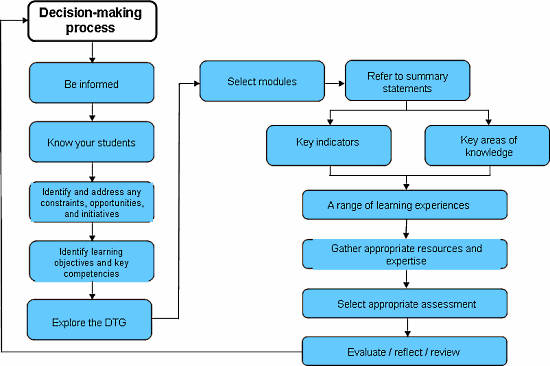
As part of my review of this years courses, I am thinking what has worked.
Interactive database design with php/mysql
Opening up the context of the digital media assessment for the student. Though the amount of work could have included a technology standard.
Not enough knowledge based standards or technology based standards.
Programming continues to challenges students. some struggle with the concepts. Managed to work through the planning, but not the programming itself.
The challenge of level one, at what level should it be operating. Looking at the best practice workshops and what is being developed nationally, am I assessing correctly. There has been a wonderful post in the association listserve which looks at what is being asked for.
We need to be cautious of over working the students and ourselves to make sure that we achieve the standards.
This was a problem within the old Technology Standards whereby we made the kids do more and more and more just to ensure a pass.
Often we made kids do the criteria for Achieved over and over and over, so that they had not a great show at M or E, but had the worlds best and most thorough Achieved result.
We need to refine the work and get efficient at doing that, other subjects have had a decade and a half or more head start on refining their standards. I went through the conversion to NCEA in Science and the initial problems, and concerns were EXACTLYT the same.
Please endure you look at the criteria, and then provide an opportunity to allow the kids to demonstrate understanding.
The criteria below is all kids need to do to get an achieved. When you look at it, its not too bad.
The problems occur when we take our years of Unit Standards approaches, and then overlay them onto an Achievement Standard, expecting the kids to complete every single stage of every single aspect. That is the fundamental difference between Achievement Standards and Unit Standards.
Image this, a student hands in a Desktop Published document that summarises the outcome from the America's Cup. It has Information about the event, it has tables and graphs from the results over the races, that were imported from a Spreadsheet. The student saved their resources in an organised way. They check the data is accurate and reference their sources. The document has obvious design elements included.
Achieved.
Even if it has some errors, or doesn't look stunning, its still an achieved. If you asked the kids why they put the data into the spreadsheet rather than into The Desktop Published document to start with, and tick off their response you have that evidence.
If they did the document accurately, and without help
Merit.
If they did the document efficiently, and without help, using the best tools
Excellence.
You as teachers do not need to have all evidence from the students as typed out full explanations with screen shots in triplicate. Create a checklist, ask the kids a number of questions. Build up a sheet of evidence that shows that you asked kids why they were doing what they were doing. Why they did it that way. Just have tick box answers. Look at the kids as you move around the room. Which ones are on task efficiently using time.
Which ones need help. Tell them to ask the question, if it will affect their grade, then tell them that they can have the answer and be shown, but it will affect their grade. Document when you help them. Just a clickboard and a class list with some columns. Send this off with your moderation, saying I gave this grade because of these observations.
Make a dummy document before hand to show them how to do the things you will be assessing them on. Like on school swimming day.
My advice is look through the schedule you are using and see how many times you are re assessing the Achieved Criteria over and over and over again.
Once they have shown they can do the requirements... thats it... they have shown they can do it.
Make the standards work for you and the kids.
• applying a set of techniques to produce a digital information outcome that meets specifications
• selecting the appropriate software applications and specific features to manage and present information
• applying file management procedures
• applying design elements and/or formatting techniques as appropriate to the outcome
• applying data integrity and testing procedures to ensure the outcome meets the specifications
• following legal, ethical and moral responsibilities as appropriate to the outcome
Looking at the terminology used for level one and the standard, I need to focus on terminology
Here's a quick attempt to answer the question below… Linda, you're right, you are probably already doing all those things. I've taken the main terms from AS91076, and put in the main examples of blocks in Scratch that you might use:
variables
make a variable/list, set x to _ (x is the variable, and can appear in lots of other commands e.g. move x steps; say x for y seconds)
types of information
number, text and lists are different types (if you set x to 5, you can add numbers to it; if you set x to "Hello" then it's text)
assignment
set x to _ (assigns a value to x); change x by _ (also assigns a new value to x). Operators will tend to be used as part of this.
sequence control structure
the idea that the the control of a program starts at one block, and then goes to the one below it. Sticking blocks together creates a sequence
selection control structure
if, if … else (selecting which path to follow by testing some condition)
iteration control structure
forever, repeat, forever if, repeat until (iterating over the inner block some number of times)
predefined actions (e.g. predefined methods, functions, or procedures)
play sound, switch costume, pen down, pick random, wait, goto, glide, change costume… there are lots of these to choose from in Scratch
input from a user, sensors, or other external source.
ask _ and wait, key _ pressed, mouse x, mouse y, mouse down (basically any of the sensing blocks)
Others who have been using Scratch might want to suggest some other useful/common ones.
Getting students to start looking at some of the issues that came up in the mashup competition or some of the issues that came from the nzta meeting in wellington.
Getting students to look at real problems is needed. As well as using the first weeks of 2014 to do the computer science standards.
The students are interested, will work well, and it will offer a challenge to put some of the concepts learnt into action. Also the need to do the technology curriculum. Looking at some of the strategies for engaging students and feeding back through moodle could offer students with a insight.
Thursday, 26 September 2013
Database assessment
An idea that quickly came into being tonight was one for the database assessment next year.
Street name database for Christchurch, based upon suburb, list alphabetical, and then clickable to show on a google map.
Street name database for Christchurch, based upon suburb, list alphabetical, and then clickable to show on a google map.
Download Christchurch street and place name listings
- Christchurch place names A-M [1.22 MB PDF]
- Christchurch place names N-Z [971 KB PDF]
- Lost Christchurch [1.14 MB PDF]
- Miscellaneous [899 KB PDF]
Street names
- Christchurch street names A [621 KB PDF]
- Christchurch street names B [1.04 MB PDF]
- Christchurch street names C [1.2 MB PDF]
- Christchurch street names D - E [807 KB PDF]
- Christchurch street names F - G [973 KB PDF]
- Christchurch street names H [801 KB PDF]
- Christchurch street names I - K [721 KB PDF]
- Christchurch street names L [485 KB PDF]
- Christchurch street names M [1 MB PDF]
- Christchurch street names N - O [425 KB PDF]
- Christchurch street names P - Q [638 KB PDF]
- Christchurch street names R [711 KB PDF]
- Christchurch street names S [773 KB PDF]
- Christchurch street names T - V [741 KB PDF]
- Christchurch street names W - Z [796 KB PDF]
Now, are we allowed to use this data?
Copyright statement
Unless otherwise indicated, the Christchurch City Council holds the copyright on all material on the Christchurch City Libraries’ websites. This material can be used for personal and non-commercial purposes free of charge without the permission of the Christchurch City Council, provided that the source and copyright status of the material is acknowledged and it is not used in a misleading way.
Wednesday, 25 September 2013
The new role of the teacher
Watching http://blip.tv/core-ed/sharon-friesen-new-roles-for-teachers-2920007
Sharon Friesen addresses a number of misconceptions about 21st century teaching, and discusses the instructional practices and expertise required of a teacher in today’s classrooms.
Sharon Friesen addresses a number of misconceptions about 21st century teaching, and discusses the instructional practices and expertise required of a teacher in today’s classrooms.
Teachers still need to be part of the process.
Sunday, 22 September 2013
Future Learning

http://stevemouldey.wordpress.com/2013/09/16/future-learning/
Some of the brief highlights of this book for him were:
- “Knowledge is innovation. Its role is to generate new knowledge, to do things.”
- The importance of developing systems level of understandings and higher order thinking skills
- A need to shift focus from skills to dispositions
A possible future course - 3D printing and robotics
I have just been introduced to Jimmy the Robot,

Jimmy is part of the brain child of Brian Johnson, Intel Futurist. Jimmy is 3D printed, and all the
development and changes will be open source.
http://allthingsd.com/20130921/intel-futurist-shows-how-youll-download-and-program-your-own-robot-next-year/
Robotics and 3D Printing - Jimmy
http://www.youtube.com/watch?v=DAWbr3dUnhY
For more information
http://robots21.com/
"If we get this open source and apps into peoples lives, they will start to come up with the really cool stuff. They will come up with the next twitter for robots." Quote from Brian Johnson, Intel Futurist. This quote resonates with me rather well, in the age of BYOD, and the New Curriculum, is there opportunity to extend and open ourselves with new ways of teaching and learning. (Page 36, New Zealand Curriculum, 2007)
The Science Fiction book 21st Century Robot explores the fictional world of Jimmy the Robot and his human, Simon Egerton. Future release of the book will contain open source design files for you to modify your very own 3D printable Jimmy the Robot!
http://robots21.com/21st-Century-Robot-Book-Maker-Faire-Edition.pdf
Imagine this as a project for a technology scholarship or student project next year, what will the student be able to get out of it? Technology in action.

Jimmy is part of the brain child of Brian Johnson, Intel Futurist. Jimmy is 3D printed, and all the
development and changes will be open source.
http://allthingsd.com/20130921/intel-futurist-shows-how-youll-download-and-program-your-own-robot-next-year/
Robotics and 3D Printing - Jimmy
http://www.youtube.com/watch?v=DAWbr3dUnhY
For more information
http://robots21.com/
"If we get this open source and apps into peoples lives, they will start to come up with the really cool stuff. They will come up with the next twitter for robots." Quote from Brian Johnson, Intel Futurist. This quote resonates with me rather well, in the age of BYOD, and the New Curriculum, is there opportunity to extend and open ourselves with new ways of teaching and learning. (Page 36, New Zealand Curriculum, 2007)
The Science Fiction book 21st Century Robot explores the fictional world of Jimmy the Robot and his human, Simon Egerton. Future release of the book will contain open source design files for you to modify your very own 3D printable Jimmy the Robot!
http://robots21.com/21st-Century-Robot-Book-Maker-Faire-Edition.pdf
Imagine this as a project for a technology scholarship or student project next year, what will the student be able to get out of it? Technology in action.
Sunday, 15 September 2013
Reflection about CS standards and when to teach the course, plus fsm
Reflecting on my students and my course. My students are tired, they take a long time to do anything currently, they are being blown out. My school has them to do six subjects, something that I cannot change, as we are a state integrated school Religious Education is the extra one, and it has achievement standards attached to it. Looking at students achievement standards sheet, some are doing 138 credits. NCEA Level 3 requires them to get 60 + 20 credits from another level, so they could get 80 level 3 credits.
Leaving the computer science to the third term seems like a mistake at this current point in time. I am thinking about getting the students when they are refreshed, not tired, enjoy learning in term 1 as a possible change for next year.
So the question is, when are you looking at learning and teaching the computer science standards next year, L2, and L3?
I put this question out in our community group as part of my uni work. The response from the lecturer;

Another example is real world example of FSM in game development, http://jessewarden.com/2012/07/finite-state-machines-in-game-development.html
Leaving the computer science to the third term seems like a mistake at this current point in time. I am thinking about getting the students when they are refreshed, not tired, enjoy learning in term 1 as a possible change for next year.
So the question is, when are you looking at learning and teaching the computer science standards next year, L2, and L3?
Two ideas I've heard from teachers who have had success with the standards:
- teach the ideas in term 1 and get them started, but do the write-up later
- teach some of the ideas in year 9 and 10, so there isn't much learning, just revision while doing the writeup in year 11.
This reflects a couple of observations:
- NCEA students can get so focussed on assessment that they don't learn (just tell me what to do for the assessment, don't confuse me with interesting stuff about the subject)
- most other subjects have years of buildup, for the ideas to mature in the students' minds and build up vocabulary. Imagine if science or maths was first mentioned in year 11?!
Unfortunately teaching a little early doesn't always fit school structures. But I would suspect that a student who did 3 hours in year 10 and 3 hours in year 11 would achieve more than one who did 6 hours in year 10.
I have just been writing reports, and one thing that caught me was when writing a students comment, he constantly asks me what he needs to do to meet the assessment. The student is not interested in learning, he is in six subjects, has many assessments, he is just looking for credits. I am thinking about what I need to do for this course right now, and I must say I probably am the same, I just want to know what I need to do just to pass. The subject that I am investigating is an area that I have had little experience with, finate state automata. Finate state automata is a device that can be in one of a finite number of states. Ok, that is simple, however when I do a search on the internet for it, I get lost in the maths symbols that follow.
An example of a finate state machine could be a digital watch, http://www.youtube.com/watch?v=OKSuzNAiR1A
One of the other class members has suggested that I look at are the links for a guided tutorial on Regular Expressions is really helpful from the CS field guide when replicating real life applications. My students saw the benefit of capturing round brackets strings so much clearer after attempting the Tutorial. Regular expressions and interpreting is a breeze for my higher achieving students.
I am currently starting to investigate the resources that are listed, http://www.i-programmer.info/babbages-bag/223-finite-state-machines.html
and
http://www.ccs3.lanl.gov/mega-math/workbk/machine/malearn.html
Some of the links don't work which is causing some issues, especially when it comes to writing notation.
This is the next part of what I am teaching the students.
Started off with the Train station task, was simple and had the students interest, but as soon as they completed it they trailed off. This comes back to the statement earlier, students only want to know at this stage of the year what they need for the assessment. they don't want to learn.
Following this we started to look at states and transitions and what this means.
Some of the links don't work which is causing some issues, especially when it comes to writing notation.
This is the next part of what I am teaching the students.
Started off with the Train station task, was simple and had the students interest, but as soon as they completed it they trailed off. This comes back to the statement earlier, students only want to know at this stage of the year what they need for the assessment. they don't want to learn.
Following this we started to look at states and transitions and what this means.
Subject selection feedback
Students this year have had difficulty logging in. Mainly due to details being incorrect within our student management system. This is of huge concern.
Other reason is students not following instructions. dd/mm/yy they have been entering ddmmyy
90% completion rate.
Things that went wrong, year 11 students could not select CAL3 or STA3, as a number of students have been advanced.
Enhanced english at year 10 was not available, this is a selected number of students.
Form tutors were given a verification form on Friday, year 9, 11, 12. Looks like i forgot to include year 10, this will be caught up on monday.
Also on monday we have to import all 2014 subject selection into musac. this will allow us to start developing a plan for 2014.
Last year running this. A project that started off as an idea and so many years service. It will be nice to start looking at another project and using my knowledge and help improve an aspect of education.
Other reason is students not following instructions. dd/mm/yy they have been entering ddmmyy
90% completion rate.
Things that went wrong, year 11 students could not select CAL3 or STA3, as a number of students have been advanced.
Enhanced english at year 10 was not available, this is a selected number of students.
Form tutors were given a verification form on Friday, year 9, 11, 12. Looks like i forgot to include year 10, this will be caught up on monday.
Also on monday we have to import all 2014 subject selection into musac. this will allow us to start developing a plan for 2014.
Last year running this. A project that started off as an idea and so many years service. It will be nice to start looking at another project and using my knowledge and help improve an aspect of education.
coder on Raspberry Pi
I was alerted to a new development for the raspberry pi on Friday by a visitor to the school.
The part I like is that it is getting students out and trying something different, a little download with a big outcome.
UPDATE: have managed to get this up and going, rather than using code.local I have had to use the IP address of the RPi to be able to access it. Password requires two Capital Letters and lowercase letters.
Interesting concepts are shown on the first screen with an introduction of how to use it.
You need to have it connected to a physical network before you can setup the wifi through the settings console.
More than one user can access the RPi as long as they have the password, but cannot collaboratively change it, you need to save the changes.
An issue: how do you add more than one page to a project? This will also impact on the css link as well.
Coder is a free, open source project that turns a Raspberry Pi into a simple platform that educators and parents can use to teach the basics of building for the web. New coders can craft small projects in HTML, CSS, and Javascript, right from the web browser.
A simple yet great idea, I have downloaded the installer and will put on a Raspberry Pi on monday to try it out.
The part I like is that it is getting students out and trying something different, a little download with a big outcome.
UPDATE: have managed to get this up and going, rather than using code.local I have had to use the IP address of the RPi to be able to access it. Password requires two Capital Letters and lowercase letters.
Interesting concepts are shown on the first screen with an introduction of how to use it.
You need to have it connected to a physical network before you can setup the wifi through the settings console.
More than one user can access the RPi as long as they have the password, but cannot collaboratively change it, you need to save the changes.
An issue: how do you add more than one page to a project? This will also impact on the css link as well.
Monday, 2 September 2013
educampTimaru
On saturday I had an opportunity to travel down to Timaru to attend a unconference. These unconferences are organised by teachers to show what they are doing, discuss, develop their knowledge on a range of topics. Almost any topic goes, from curriculum delivery, assessment, teaching and learning.
Arrive at Craighead, a all girls school in Timaru you get to see the old buildings, the park like setting and the teachers.
The start of day as normal starts with a smackdown, where people inform others about various applications, apps...
However, there was one special moment during the day, one of the teachers from the school introduced us to her work. She is a design teacher who had just been given a App Crayon and was thankful, it worked faster than her stylus. She introduced us to a couple of her recordings, which she makes available to her students. Introduction to Pinterest, dropbox and one other. Now what amazed us was the level of detail, interactions with the students, reflective on her practice. She kept talking about not being an expert. But hey, what is a expert these days. Her words were constantly, "But I have only been doing this for a year", a year of development, a year of interactions with students, a year of BYOD, a year of developing a new Level 3 programme.
Amazed at the what was happening, a number of us in the group want her to share her practice with others. This is a teacher who is passionate, developing the curriculum through the first section, developing effective pedagogy and using BYOD to enhance and encourage learning.
Her response - "But I have only been doing BYOD for a year"
Arrive at Craighead, a all girls school in Timaru you get to see the old buildings, the park like setting and the teachers.
The start of day as normal starts with a smackdown, where people inform others about various applications, apps...
However, there was one special moment during the day, one of the teachers from the school introduced us to her work. She is a design teacher who had just been given a App Crayon and was thankful, it worked faster than her stylus. She introduced us to a couple of her recordings, which she makes available to her students. Introduction to Pinterest, dropbox and one other. Now what amazed us was the level of detail, interactions with the students, reflective on her practice. She kept talking about not being an expert. But hey, what is a expert these days. Her words were constantly, "But I have only been doing this for a year", a year of development, a year of interactions with students, a year of BYOD, a year of developing a new Level 3 programme.
Amazed at the what was happening, a number of us in the group want her to share her practice with others. This is a teacher who is passionate, developing the curriculum through the first section, developing effective pedagogy and using BYOD to enhance and encourage learning.
Her response - "But I have only been doing BYOD for a year"
Sunday, 1 September 2013
year 9 students and a 10c piece
I have been busy changing my year 9 course, so far we have not touched any office products. We have been use google docs as our productivity suite. Setting up documents in word processing, sheets. It is the sheets that I have had fun with. First task was to put in cities within new zealand and then find the top temperatures for the next five days. Simple enough task, metservice, however, students have a different opinion on what a city is. Once completed, they them average the temperature, min and max.
Second task, test results for 10 students, also a good way to get to know your students. 5 Test results and leave one out due to they were "sick" that day. average, sum, min, max and count. Now they have to explain why there is only 9 results on that test and not 10 like the others. I also brought this is as error checking, starting to bring in some simple computer science into the course.
 Next task, flipping a coin. Now I must admit I got his idea out of a maths book. 100 flips of the coin. Easy enough, now list the number 1 to 100. Students learn about the use of fill down. Students then go through and list Heads or Tails depending on what they tossed. Then a introduction to the COUNTIF function. And also introduction to the division (/) to find out the percentage where they get to use the % button.
Now to do the simple stuff like, addition, subtraction, multiplication and division.
But what amazed me was that in the 9 years they have been doing mathematics, not once had they ever flipped the coin?
Imagine what would happen if I brought a bag of m&m's to the class and worked out how many of each colour there would be in a packet?
Yes, I did get all of the 10c pieces back at the end of class.
Second task, test results for 10 students, also a good way to get to know your students. 5 Test results and leave one out due to they were "sick" that day. average, sum, min, max and count. Now they have to explain why there is only 9 results on that test and not 10 like the others. I also brought this is as error checking, starting to bring in some simple computer science into the course.

Now to do the simple stuff like, addition, subtraction, multiplication and division.
But what amazed me was that in the 9 years they have been doing mathematics, not once had they ever flipped the coin?
Imagine what would happen if I brought a bag of m&m's to the class and worked out how many of each colour there would be in a packet?
Yes, I did get all of the 10c pieces back at the end of class.
Subscribe to:
Posts (Atom)

