Tuesday, 29 April 2014

Term 2 Post

I decided not to write anything to the google that I belong to over the holidays. This has been a struggle as I normally post 1-3 items a day. I decided to give it a rest. However, it means that there is a lot to focus on when I get back on Monday. So, I have decided to use the my blog as a way to start to put together the information.

NZACDITT April News?

First CS4HS

Announced on the http://cosc.canterbury.ac.nz/cs4hs site is the three possible New Zealand CS4HS events this year. One in Christchurch, Wellington and Auckland.

However, please note that there are differences.

Canterbury will run one that (like previous ones) is focused on the Computer Science and Programming Achievement standards, for teachers who are at beginner/intermediate level, so the discussions will be more focussed on getting started.

The Victoria one would be more general, looking more at areas of computer science that are of general interest, even if they are outside the standards (this is the model used for CS4HS overseas, and gives a broader view of the topic, which would be more suitable for those already teaching the standards.)

Unitec will also be running a CS4HS workshop this year, which is likely to cover mobile applications and devices, cyber-security, artificial intelligence, and robotics.

Second, Electronics

It is important to remind people that there are five strands of Digital Technologies, Digital Information, Digital Media, Programming and Computer Science, Digital Electronics and Digital Infrastructure. 

Bill Collis from Mt Roskill Grammar School has made his entire teaching resource available, through http://techideas.co.nz, this is an expansive piece of work that show the commitment he has to the subject area. Courses ranging from Year 10 to Level 3 including Scholarship have been made available. Thank you Bill for making this work available.

Third Progression to Tertiary

As we know, there has been a large project by NZQA and IITP to look at the qualifications that our students could work towards at a tertiary level. This work seems to be coming to an end with some impressive results. It seems that have followed what happens with Senior Secondary and the Digital Technologies strands and aligned a lot of programmes to these. Rather hard when there are over 200 qualifications out there.

Fouth Promoting our subject - Digital Choices

Techlink have listened to what we had to say, I think they really didn't like it when we voiced our concern over the words Digital Technology... which should have been Digital Technologies. However, they have a rather impressive brochures now that will be useful at career evenings

New Futureintech brochure: Digital Choices
Front cover of digital choices brochureWe’ve recently published two new brochures about careers in engineering and IT – these are the two areas where there is the most confusion among students, teachers and parents/caregivers.
Written in consultation with industry and education stakeholders, the Digital Choices brochure provides in depth information about careers in the IT industry. We’ve created a diagram that gives an overview of tertiary qualification pathways, which reflects the new 14 qualification framework.
All of Futureintech’s print publications can be ordered online: www.futureintech.org.nz/order-form.cfm
We welcome your feedback on the brochures and qualification diagrams – please contact Megan Rodden, email: writer@futureintech.org.nz
Something else that can be given out at Careers evenings is the brochure from http://csanz.ac.nz/high-school/, which is the Computer Science Association of New Zealand. This brochure has good quotes and information on how each of the Universities see Digital Technologies - Computer Science and Programming and how it fits into their courses.

Fifth Brief Development

Craig Jefferies from Wakatipu College in Queenstown has been putting together resources to assist his students in the development of Digital Technologies projects. For those that have meet Craig at the various NZACDITT symposiums, he is a Technologist using Generic Technology and Digital Technologies Achievement standards together to create workable, sellable products. He has made these resources available through the NZACDITT website, 3.1 Brief Development, Year 9 and 10 Technology Resource
These are available through the NZACDITT website

Six External Standard Best Practice Checklist

http://nzacditt.org.nz/resources/external-assessment-best-practices-checklist
With the release of the External Standards Report next week, I have been told that they will available the first week of Term 2. I know, please don't get me started. As we have all been told by our schools no doubt, to reflect on our results. The Best Practices Checklist is something that is worthwhile doing, something I do myself, all of the material I put together and have this wonderful book so I can look at the standard, the material and have it all in one place. It also reminds me of what I need to look for.

Seven Online moderation

Having just been through a moderation round at our school, it was pleasing to note that I was the only one that completed the online moderation, all of the others rushed to find work, bag and tag. This has been a no rush, no fretting exercise and was surprised how easy it went. For more information on how to do online moderation,  http://www.nzqa.govt.nz/about-us/publications/newsletters-and-circulars/assessment-matters/online-submission-of-moderation-materials/

Eight Digital Information

James Murfitt has produced a number of resources for use with teachers around the Digital Information Skills standards, Please note that these are not being presented as complete and perfect resources. This is what I created and used. I am not professing to be an expert, so I may have things wrong etc. However, I have put a lot of effort into these resources so thought that if someone else was struggling they could use them, or get ideas from them. www.teawamutucol.school.nz/DTC/index.htm
1.41, 2.41, 3.41
1.43 & 3.43
1.45/1.46

Nine Computer Science Club

Over the last few months we have been planning on how to restart the Computer Science Club in 2014 but also bring the learning experience to many more around the country due to the increasing demand. We have now changed focus and have joined forces with the New Zealand Institute of IT Professionals (IITP) to focus on developing a computer science badge system and supporting resources for school students that any club can run, instead of running a limited number of clubs in Christchurch.

We hope new and existing computer clubs in Christchurch and around the country will adopt this new system. These may be run during school lunchtimes, after school, at libraries, universities, or at workplaces in the IT industry. We will be helping establish these clubs around New Zealand, and once clubs start our website will list available clubs.

We aim to have several clubs running the Computer Science Badge system by the end of Term 2. Keep tuned to the website at www.computerscienceclub.org for more information over the coming weeks.

Thank you for your patience,

Jack Morgan and the rest of the Computer Science Education Research Group at the University of Canterbury

Ten

Friday, 25 April 2014

smart citizen update

I now have the Smart Citizen working, however there are two things I regret, one is not getting the solar panel, instead it is being hooked up to a USB charger to supply it power, the battery only lasted 11pm-3pm, which isn't enough for a days usage... The other was not getting the other enclosure. The one that I have I realise, is an indoor enclosure, which by the way came with no instructions on how to put together.

I have enjoyed getting the Smart Citizen working, and look forward to getting it working at school. With the idea of just using a sd card at this point. But, I have realised looking at the forum, this requires getting a battery to keep the clock going when it is turned off, else the date and time reset and I have useless data.

Smart Citizen are working on a feature that will allow me to upload the data from the card to their website, but at this point it is attach to an email and send them the file. Not that useful. It will be interesting to see how much data would be recorded in a day. Could be useful to talk to the students about how to store this data and access it.

I look forward to recording data for the rest of the year, however I am yet to figure out how to do this without a solar panel or a way to join it to our network-it doesn't do enterprise level wifi.

I would love to see how to develop this idea further, we have some free wifi areas within our city, I wonder if with some funding we could develop this for Digital Technologies secondary school students. .

This is the video from cisco live melbourne https://www.youtube.com/watch?v=spHx-GoABZs

developing sensing city, or develop a citizenship culture?

The more I think about the project, the more I start thinking broadly.

Are our trees mapped in Christchurch?

I have found this interesting website called, http://openplans.org/, all of there work is open source and available. Could this be the development of an interesting project for students to look at the concepts of developing a active online culture?


Linking two resources together

There has been a large project happening for a number of years, http://csunplugged.com, this project has simplified? the ideas of Computer Science for students. As I have heard it once called, making big words easy to understand.

All of these resources are linked to the New Zealand Curriculum. We need to have it out there that these resources exist, and can be used to help teach technology at lower levels of the curriculum.

There are twenty five tasks...
Binary Numbers
Image Representation
Text Compression
Error Detection
Information Theory
Searching Algorithms
Sorting Algorithms
Sorting Networks
Minimal Spanning Trees
Routing and Deadlock
Finite State Automata
Programming Languages
Graph Colouring
Dominating Sets
Steiner Trees
Information Hiding
Cryptographic Protocols
Public Key Encryption
Human Interface Design
The Turing Test
Phylogenetics Unplugged
Class Simulation of a Computer
Harold the Robot
Modems Unplugged
Santa's Dirty Socks

All of the ideas link to the Technology Achievement Objectives
http://technology.tki.org.nz/Technology-in-the-NZC/Key-publications/Technology-Curriculum-Support/Indicators-of-Progression/Achievement-Objectives

How to develop a way to make this work...

UPDATE:  I have started to work out what links to what level in the Technology Achievement Objectives, and there are some that need some work on identifying what level they should be under.

Mathematics Level 1: Number strategies Use a range of counting, grouping, and equal-sharing strategies with whole numbers and fractions.
Error Detection 

Mathematics Level 1: Equations and expressions Communicate and explain counting, grouping, and equal-sharing strategies, using words, numbers, and pictures.
Image Representation, Error Detection 

Mathematics Level 2: Position and orientation Create and use simple maps to show position and direction.Image Representation Generalise that whole numbers can be partitioned in many ways.
Binary Numbers Find rules for the next member in a sequential pattern.

Binary Numbers Mathematics Level 3: Patterns and relationships Generalise the properties of addition and subtraction with whole numbers.

Binary Numbers Connect members of sequential patterns with their ordinal position and use tables, graphs, and diagrams to find relationships between successive elements of number and spatial patterns.

Binary Numbers Technology Level 1: Characteristics of technology Understand that technology is purposeful intervention through design.

Error Detection Technology Level 1:Technological systems Understand that technological systems have inputs, controlled transformations, and outputs.

Binary Numbers, Text Compression Technology Level 1: Characteristics of technological outcomes Understand that technological outcomes are products or systems developed by people and have a physical nature and a functional nature.

Error Detection Technology Level 3: Technological systems Understand that technological systems are represented by symbolic language tools and understand the role played by the black box in technological systems.
Binary Numbers, Image Representation, Text Compression, Error Detection

Thursday, 17 April 2014

Start with Code

Once in a while I come across an interesting resource, tonight its start with code. This seems to be a development within Australia.
http://static.googleusercontent.com/media/www.google.com.au/en/au/campaigns/startwithcode/assets/Start_with_Code_Booklet_Online.pdf

It is interesting when you find resources like this, and start wondering, why there isn't the same shift starting in New Zealand.

http://www.google.com.au/campaigns/startwithcode/student.html

There is a number of different aspects that can be looked at, Students, Parents, Teachers, and others.

START WITH CODE / Australia’s Innovation Generation

What is New Zealand's Innovation Generation?
One place I am starting to look at is the Ministry of Business, Innovation and Employment. http://www.med.govt.nz/ this is the website for Economic Development Information?

ok, now I am at http://www.msi.govt.nz/ Which is the Ministry of Business, Innovation and Employment
This website contains information on a range of science issues including funding, research and development, the science + innovation community, major projects and events. The site is owned by the Ministry of Business, Innovation and Employment.


I have now given up, trying to find, have resorted to tweeting them questions. 


Tuesday, 15 April 2014

STEM?

I have been asked to do some work on STEM, the focus being on air.

Though there is a problem, where to start? Multi Level, and the theme being air.

Science, Technology, Engineering and Mathematics

Where would I start looking for resources to support this?

Saturday, 12 April 2014

Smart Citizen

http://smartcitizen.me/ I was watching the CISCO Internet of things that is being presented in Melbourne today, one thing that interested me was, Smart Citizen.

Smart Citizen is a platform to generate participatory processes of the people in the cities. Connecting data, people and knowledge, the objective of the platform is to serve as a node for building productive open indicators and distributed tools, and thereafter the collective construction of the city for its own inhabitants.

The Smart Citizen project is based on geolocation, Internet and free hardware and software for data collection and sharing ( Smart Citizen Kit - SCK , RESTful api, Mobile App and, the web community

Now the reason I am interested in this is around the idea of sensing. There is a project in Christchurch that is looking at sensing city. www.sensingcity.org, this was presented to us last year at the Christchurch Mashup. Now the idea is simple enough.

One of these has now been ordered and we look for a place to install it at school.

Some interesting stuff here. I like what the author refers to the citizens http://blog.r-a-u-m.com/post/58999796007/what-it-takes-to-be-a-smart-citizen

The Smart Citizen project is what Living Cities and OpenPlans call Civic Tech.  They define “civic tech” as the use of technology by cities for service provision, civic engagement, and data analysis to inform decision making. Civic Tech has the potential to transform cities and the lives of their low- income residents. They’ve published a report about their field scan, where you can learn more about it.
This come through the CISCO Live event from Melbourne.

This has started off a number of ideas, one of these includes a STEM event 8-10th October at CPIT, where students can look at the theme Air.


Thursday, 10 April 2014

Sharing Digital Technologies resources

These are my thoughts and not that of a sensible human being in the last week of a twelve week term...

I experienced tonight a fundamental shift in understanding. The codeworx event in Christchurch was a wonderful experience that I heard great things about from those that attended the Auckland event. I was not disappointed. For those that are not in the two main centres of Te Ika-a-Maui and Te Waipounamu, videos will be made available soon through the Codeworx site. 

It is interesting that we look at programming as in software development only, tonight I was shown a tweeting pot plant... When I look at the code, and what it does in less that 40 lines, would be less if there wasn't commenting in it... but as we know if a student doesn't have commenting within their code it is a not achieved. However, the idea of student integrating different technologies http://vimeo.com/87051055, I understand there is a teacher resource being made available soon.

But it has me thinking, new ideas, a search of the internet and I find this.. http://www.engineering.geek.nz/sites/default/files/attachments/VUW%20Multifunction%20quiz%20board.pdf where has this been hidden all this time... what else out there exists to gain interest in our area, what hidden work is there for information, media, electronics and infrastructure. 

As I write this, I start seeing more ideas of digital technologies, an electric car competition http://evolocity.co.nz/ that not only looks at the development, but social media, video competition and a sound synthesiser competition (why you would need one of them with an electric car?). 

I look forward to seeing who the winner of the Media Design School create a hero competition is, entries need to be in this Friday. This seems to be a competition for year 9 and 10 each year, details are on the nzacditt.org.nz site.

The Bay of Plenty have just completed a mashupcompetition, 
1.     The Trustpower Best Mashup 2014: Equinox from Tauranga Boys’ College
2.     The Avonmore Best Technical Mashup: Equinox from Tauranga Boys’ College
3.     The Bay of Plenty Polytechnic best designed Mashup: Whakamashers 2 from Whakatane High School
4.     The Technology Wise best managed Mashup: Solid Impact from the Katikati Home School group
5.     The Wharf 42 best marketed Mashup: Ghillie Enterprises from Mount Maunganui College
6.     Bay of Plenty Regional Council prize for best use of open data: Victorious Secret from Mount Maunganui College

An amazing effort by the students at these school to incorporate what they are learning within the school into real world applications.

Its only term one...

Back to my original start.. if anyone has found resources like the engineering.geek.nz which has NCEA digital technologies assessment material, please let me know... (I think everyone knows about instant and eduwebb) its the other ones that we need to share...

competition

Tonight was the launch for one of the countries first Digital Technologies competition. codeworx in Christchurch. This is the second year that it is running. With over 500 Raspberry Pi's in the hands of students throughout the country we look forward to what they come up with.

www.codeworx.co.nz

Sunday, 30 March 2014

nzta professional development

I have been to quite a number of Professional development sessions where you talk away one or two bits of information. But this one struck a massive part of not just my teaching, but outside of teaching itself.

Citizenship, yeah, such as boring topic, national, labour, what elections are about. But no. There is another citizenship. That is one around the road. I took 4 students to film some workshops at the nzta education workshop in Christchurch. Something in which they thought, go in, sit there, film, eat some lunch. But no. The session was for them... to discuss how they use the road to teachers, to give their situations, to give their stories. It was even a chance for one of them to explain what was being planned had adverse affects on him as well as other students.

I will write more over the next couple of days as I process more of the sessions, but when you get a tweet like this, you just have to share.
A lot of this has to do with the people at the nzta, they have thought through a lot of how this relates to everyone, and what it means to be a citizen of the road. With the latest campaign of identifying a person who uses the road. 

One ad had an interesting spin on it for me, 


There are great resources available for teachers to use, http://education.nzta.govt.nz one that I found useful was the one around the adult literacy standards, these are ones that we are targetting at school for some of our students to assist them with the opportunity to gain L1 Literacy. It will be interesting having a conversation with those in charge this week around how we can assist them in two ways, the road code, and literacy.

Tuesday, 25 March 2014

reflecting on a meeting

We had an elearning meeting yesterday. It was interesting to hear the stories of the teachers that are being involved with the class. 

However, there was a strong point being made, not enough time. Time develop resources, time to investigate apps and ideas. Something that these teachers feel like they sit in front of a computer looking at resources and ideas for 2-3 hours and felt that they haven't got anywhere, or felt that they were on the right track. How long do teachers take to develop a resource, or an idea. Or are they using other peoples. I know in my own teaching that an idea is developed over time, not normally for this year, but the idea has been worked away for around 6 months on and off. It allows me to think about how I will use it within lessons. 

Being a digital technologies teacher technology and skills are changing all of the time. Do other teachers not experience this?

We have been looking at the SAMR model, with developing resources and the like to be able to just do S at the point. However, it is with interest that the teachers started off the year with wanting to do things online and they offered paper copies. A couple of student took the option of the paper copies. As we move further through the year, more and more paper copies are being handed out. Why is this? is it because its easier for the teacher? Students? 

We need to investigate why this is the case?

I think one thing that is missing hugely is the support of other teachers in this. This is a trila, it is where it is starting for the rest of the school.

We are heading away to the BYOD conference in auckland later this term. We have set a challenge for the teachers. Take one thing from the conference, build on it within your classroom practice over 6 weeks, and them present it to the group. we need to start looking at professional development time within schools in a different way. We need to build relationships within our own and other schools in developing support and ideas for each other. Could the connected educators month in October be a way of doing this, or will secondary teachers not get on board, will it be the rhelm of Primary teachers?

These teachers need a kick start, they need to realise that they are not alone in this development. 

Problems faced within the BYOD class. Classroom behaviour, we set the class up to be in one room this year, support, try new things out. However, all I hear is that the room doesn't work for these teachers. Interesting, as the teacher feels that they are the visitor in the room rather than the teacher owning the room as they normally do. Classroom setup seems to be another big factor in this. Each teacher wants the room setup for them, they way that they like it.. Considering we have three very different styles of classrooms within our school. We have the 1960's block where rows feature and the odd group  We have the new prefabs that are longer in width , though the rooms are set out in a similar fashion, the room is worked towards the front. It is interesting that I think about this, as the festival of education over the weekend I was shown a number of slides where the classrooms of the world were shown, no matter where in the world they were they all had a board at the front, rows of students all facing the board. I realise that my room is different, the way it is setup is more for students to look at wall space rather than the front of the room, it is why I have to move around. I don't know how to teach in a normal classroom. all of my students look towards walls and windows, just with the room layout.

With the way that the room was initially set out that the teacher wasn't the focus of the lesson, as the students were looking at walls and windows, rather than the focus being at the front of the room, on the teacher. Interesting that they have just changed it so the teacher can stand at the back of the room and all the students are looking at the front of the room now? How long will this last before they change the room again. As in there normal classroom, the design of the classroom is very much focussed on them.

Sunday, 23 March 2014

Orionhealth, codeworx and Raspberry Pi

I have had my students enter a competition called codeworx. Using a raspberry Pi they are to develop something to assist with their lives. Thinking about this a little bit more, I would like to see it help with a part around medical healthcare, but that will come later on.


On friday we had Friday Pi-day. The day they received their Raspberry Pi. This day was a special day for them. When have they been given something? When have they been given something at school. Now, this was also another experience, one student missed out? What do I do. He hadn't followed the instructions and all of his classmates got a Raspberry Pi. Some ways I feel that I should be doing something for him, but he hadn't followed the instructions? 

For the students it was like christmas, as soon as they had them I thought they would just go in thier bags and be investigated later on at home. But no, they wanted to get them going then and there. It provided some students  a challenge as there SD card wasn't set up correctly and therefore wouldn't boot. Downloading NOOBS and having it available for them to copy across fixed this. 


It was a heartening experience to give out over $2000 worth of hardware to these students. One that I hope can happen again. These students are treasuring this gift and we have some wonderful experiences to share over the next few months as they investigate, develop work for the codeworx.co.nz competition.


I recieved an email from a teacher, it was about a student who was not doing the teachers homework this weekend as he would be too busy playing with the raspberry pi.
Hang on, he isn't playing, he is choosing to do my homework. Why can't students choose to do what engages them in their learning?

Online assessment

Come on NZQA, the students are wiping the floor with you in terms of working in the 21st century. I am sure all your examiners must have access to computers and the internet. Surely? Why can't the way the students work be the way they are marked and assessed too?"

this is from a blog post http://bobthedog3.blogspot.co.nz/2013/11/ncea-external-posting-not-lot-of-fun.html that I found from a Design and Visual Communication teacher fighting for what we have been given by NZQA.

As I have posted before, we need to be encouraging our students to and in their work electronically, having done the EDEM626 course last year all university work is now handed in electronically and with the conversations polytechnic's are also online handin. We need to be working in this space.

Saturday, 22 March 2014

Looking at Ka Hikitia

Looking at Ka Hikitia, With the new document coming out last year there have been a couple of blog posts that have been written to explore what it means for educators.
http://nzcurriculum.tki.org.nz/Curriculum-resources/NZC-Online-blog

Thursday, 13 March 2014

Where is Digital Technologies heading?

I don't know of I could summarize where Digital Technologies is going, as there are the five distinct strands plus Generic Technology.
There is also the Vocational Pathways that are coming into play this year.

There is a comment made in a reply to a thread in the NZACDITT google group that resonates with me, "Yes there are some food projects that are not at level 8 of the curriculum but the number of ICT projects I have seen from year 13s that are clearly year 9 work is greater than the number of food projects!"

We need to building up the specialist Knowledge and Skills strands, we need to be moving forward with the knowledge strands, not just the skills strands. Though to be able to show knowledge, we need to have the equipment and facilities to do so. Going with the food analogy from above, doing a function for 200 using a domestic kitchen is possible, but the quality and quality assurance is just not going to be there. You need a proper kitchen and facilities to be able to do the job well, consistent quality and quality assurance to make sure that the product goes out looking the same. This is the same in the Digital Technologies spaces, are we developing a quality outcome that meets the needs of our students and the learning objectives.

The learning Objectives are detailed in the link below,
Learning Objectives of the specialist Knowledge and Skills strands
Indicators of Progression – Learning Objectives (248kb, PDF)

Next requires some outside work, from professional Development, rather than the normal PD opportunities through the Ministry of Education, we use the subject association more. As it has been talked about through the PPTA Subject Association forum, the best PD has been offered by subject associations. We need to also create better links with industry, through the IITP conference last year it was talked about how industry could be assisting the development of this area. We possibly need to be making more use of this area, one thing I talk about with teachers is the idea of real world problems. What type of assessments are we delivering to our students.

Going with some of the information,
  • At least 80% of Digital Technologies teachers believe the assessment standards for their discipline(s) are sufficient, relevant, and fit for purpose.
Do teachers currently believe this?

Tuesday, 11 March 2014

BERG, Prototyping washing machine

Sometimes we struggle to understand the interface of all the Digital Technologies and how they work together. One example I was shown tonight was the household washing machine. 

If all washing machines looked like this and has this type of control I might want to do washing more often.(no jokes please)

I do wonder if AS3.10 could be done about the design of washing machines? 


Cloudwash is a prototype connected washing machine. We created Cloudwash to explore how connectivity will change the appliances in our homes… and to figure out what new features will be possible.

Could students develop an interface for a washing machine? HCI for Juniors?

There is a lot more detail available at http://blog.bergcloud.com/2014/02/25/cloudwash/
and having a look at the http://blog.bergcloud.com/ there are some interesting ideas that could be investigated further by students.

metadata: Design, electronics, HCI, mobile control, prototyping

Saturday, 8 March 2014

time for a reboot

I saw something interesting on twitter this evening, and i have been thinking. I need a reboot.

I'm heading over for a 'reboot' day next month so will mention your awesomeness (not that you need it)

Tuesday, 4 March 2014

formal languages - how good is your regex foo?

been working on ideas for more around formal languages. This idea came from something I saw at an office tonight.


Found this site http://www.regexper.com/

What does this code snippet do?…
1
/^[0-9a-zA-Z]+@[0-9a-zA-Z]+[\.]{1}[0-9a-zA-Z]+[\.]?[0-9a-zA-Z]+$/
Those with several years development expertise will realize it’s a regular expression. But even the most astute guru will take a few moments to determine that it checks the validity of an email address. Only a superior subset of that group will comprehend that it’s fairly superficial and won’t check all possibilities.
Regular expressions are extremely powerful search patterns which can be used for string matching and replacement. They’re supported in the majority of languages including JavaScript, PHP, Perl, Java, C#, Python and Ruby.
Individual rules are normally straight-forward, e.g. [a-z] matches a single lowercase character andc.t matches a three letter string starting with ‘c’ and ending with ‘t’ — such as ‘cat’. However, when rules are combined, an indecipherable string of seemingly random codes starts to appear. The one above is relatively simple compared to many you’ll find in the wild.
Creating your own regular expressions is difficult enough and many of us resort to using the force. But it’s easy compared to parsing someone else’s code — which is normally written by someone who has an irrational aversion to comments!
Fortunately, Jeff Avallone has created a solution to your regex woes. RegExper transforms meaningless JavaScript-based expressions into a graphical representation:
Regexper
Admittedly, you’ll still need a reasonable understanding of pattern matching, but it’s far more evident the expression is analyzing an email address.
Behind the scenes, RegExper is a Ruby application which translates regular expressions into an SVG image. The SVG is embedded in the page, but it should be possible to extract or copy it for use in your own documentation.

Also: great slides that describe regex, http://courses.cs.washington.edu/courses/cse154/13sp/lectures/slides/lecture12-regular-expressions.shtml

Microsoft Office for students

This has been an interesting experience,

Student Advantage enables every school in New Zealand that licenses Office for staff and to be eligible to get Office 365 ProPlus for students at no additional cost. You can get it now!
This supports the Bring Your Own Device (BYOD) or 1:1 learning programmes that you may be looking at implementing, or are currently running in your school. Office 365 Pro Plus is the full version of Office and allows each student to install the full version of Office on up to five PCs or Macs.
To take up this benefit, the next steps are:
  1. Contact Datacom to add the zero-cost license Student Advantage SKU to your Microsoft agreement.
  2. To do this you will be invoiced a $75 administration fee from Datacom.
  3. If you do not already have Office 365 A2 plan ordered, this will also need to be ordered and will be included in the $75 administration fee above.
  4. Check with Datacom that your contact person for Office 365 and Student Advantage activity is correct.
  5. Deploy the Office 365 A2 Plan service for staff and students; then Students are able to download the Office ProPlus client software to their devices (up to 5 devices per student).
Please contact your Microsoft Reseller for more details:
▪ For schools enrolled in the Microsoft Schools Agreement with the Ministry of Education, please contact Datacom on nzschools@datacom.co.nz.
• For all other schools, please contact your Academic Reseller or partner.

Now we need to get the Single Sign on working

dropbox on linux server

Been thinking about this one for a while, was shown it at some pd last year. It has taken me until now to get something up and going..

http://ubuntuserverguide.com/2012/06/how-to-install-and-configure-dropbox-on-ubuntu-server-12-04.html

There is one more part that I am working on, and that is getting the dropbox folder _httpd_ linked in to the www folder, so any changes I make are automagically updated.

for that part, see in this section
http://gathergather.co.nz/resources/building-the-web/Building%20With%20Wordpress.html#Installing Wordpress

Sunday, 2 March 2014

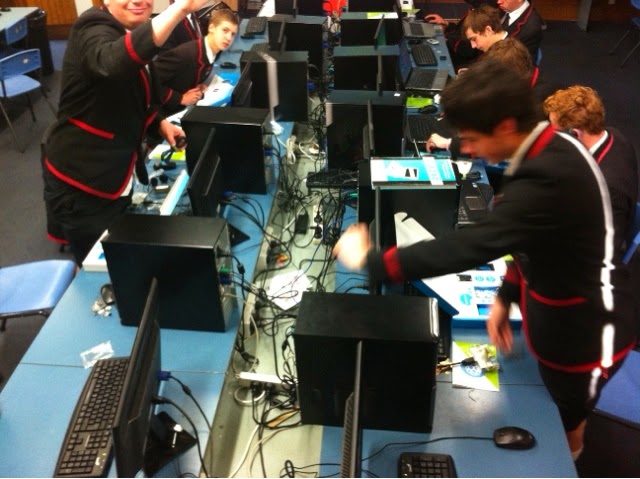
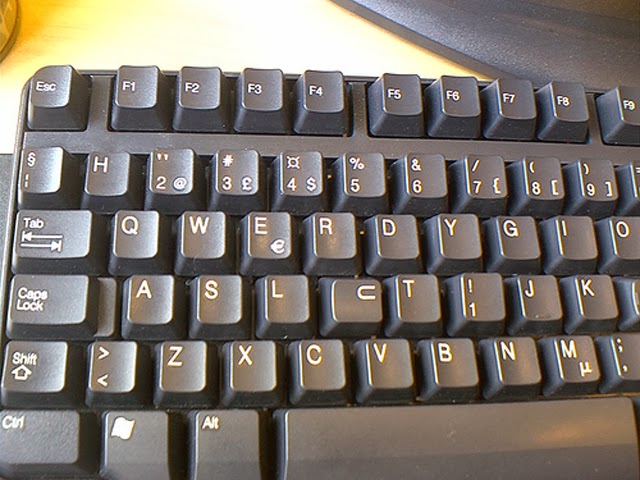
Computer Lab issues

We have an issue going through the school at the moment, something that I have not encountered for a while now and surprisingly never happened in my computer lab, until now.


The messed up keyboard. It seems that the thing to do is to change the keys on a keyboard and see what words you can make.
I will be having a chat with the students that sit in particular seats this week. Surprisingly the students sit at the same seats each period, so it is easy to sort out who has done what. But why do it? boredom, work too hard? Guess I will find out.